
Introduction: The Stream Deck Revolutionized, Now AI-Powered
The Elgato Stream Deck has become an indispensable tool for content creators, offering a tactile and customizable interface to control various aspects of their streams and production workflows. From launching applications and triggering sound effects to managing scenes and social media, its versatility is undeniable. However, even with its powerful customization options, manual configuration can become time-consuming and repetitive, especially as workflows grow more complex. This is where the concept of an AI-powered Stream Deck emerges as a game-changer. By integrating artificial intelligence, creators can unlock unprecedented levels of automation, leading to increased efficiency, enhanced creativity, and deeper audience engagement. Imagine a Stream Deck that anticipates your needs, adapts to your content, and proactively streamlines your entire production process. This is the promise of AI-driven automation for your content creation.
Quick Answer: What is an AI-Powered Stream Deck?
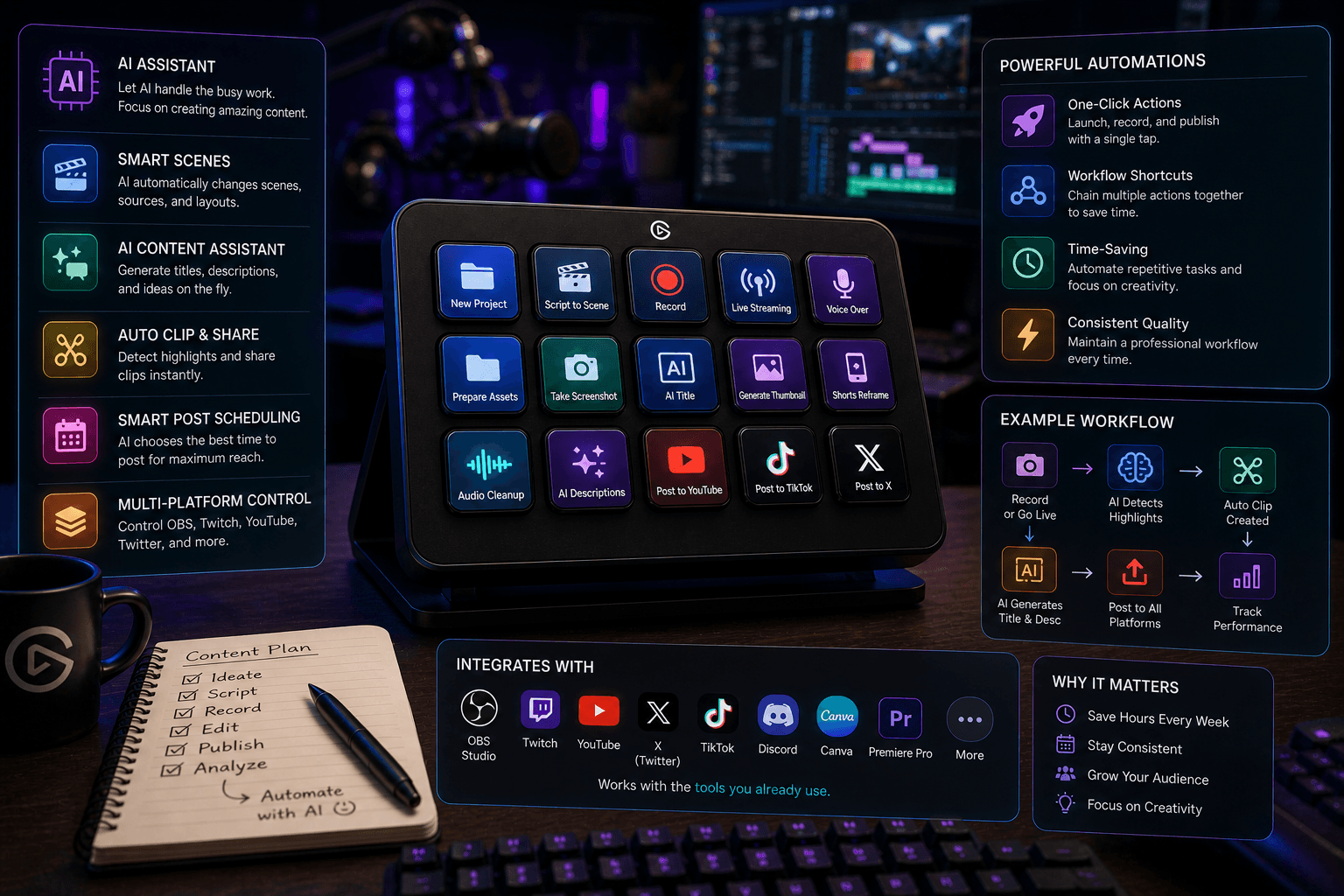
An AI-powered Stream Deck leverages artificial intelligence to automate and optimize your content creation workflow. Instead of manual button presses, AI analyzes your stream's context, audience interactions, and content trends to dynamically trigger actions, adjust settings, and even generate content ideas. This intelligent automation significantly boosts efficiency, enhances content quality, and improves viewer engagement.
Understanding the Power of AI in Content Creation
Artificial intelligence is rapidly transforming various industries, and content creation is no exception. AI's ability to process vast amounts of data allows it to identify patterns and insights that would be impossible for humans to discern manually. In the context of content creation, AI can analyze real-time trends, understand audience preferences based on engagement metrics, and predict what types of content will resonate most effectively. This analytical power extends to automating repetitive and mundane tasks, such as sorting clips, generating basic descriptions, or scheduling social media posts. Furthermore, AI can act as a creative catalyst, suggesting new content ideas, generating variations of existing content, or even assisting in the editing process. The ultimate goal is to create more personalized and engaging experiences for the audience, making them feel more connected to the creator.
How AI Automates Your Stream Deck: Use Cases
The integration of AI with a Stream Deck opens up a world of possibilities for dynamic and intelligent automation. Here are some compelling use cases:
- **Dynamic Scene Switching:** Imagine your Stream Deck automatically switching to a 'Gameplay' scene when you launch a game, or transitioning to a 'Q&A' scene when a specific keyword appears in chat. AI can monitor game events, viewer interaction patterns, or chat commands to intelligently manage your scenes without manual intervention.
- **Intelligent Audio Control:** AI can analyze ambient noise levels and your voice volume in real-time. It can then automatically adjust your microphone sensitivity, apply noise reduction, or even trigger specific audio effects to ensure optimal sound quality for your audience, regardless of environmental changes.
- **Automated Social Media Posting:** After a stream, AI can analyze the most engaging moments, identify key highlights, and automatically craft and schedule social media posts (like tweets or short video clips) to promote your content and keep your audience engaged between streams.
- **Real-time Captioning and Translation:** For creators aiming for a global audience, AI can provide highly accurate live captioning and even real-time translation of your stream content. This makes your broadcasts accessible to a wider range of viewers and enhances inclusivity.
Benefits of an AI-Enhanced Stream Deck for Content Creators
Adopting an AI-enhanced Stream Deck workflow offers significant advantages for content creators looking to elevate their craft and business.
- **Increased Efficiency:** By automating repetitive tasks like scene switching, audio adjustments, and social media updates, creators can reclaim valuable time. This freed-up time can be dedicated to more creative endeavors, strategic planning, or simply taking a much-needed break.
- **Improved Content Quality:** AI can provide data-driven insights into what content performs best, helping creators tailor their output to audience preferences. This leads to more engaging, relevant, and higher-quality content that resonates with viewers.
- **Enhanced Audience Engagement:** Features like dynamic scene changes based on viewer interaction or personalized content suggestions powered by AI can create a more immersive and interactive experience for your audience, fostering a stronger community.
- **Reduced Stress and Burnout:** The constant need for manual configuration and management can be draining. Streamlining your workflow with AI-powered automation reduces the cognitive load, minimizes errors, and helps prevent the burnout that many creators experience.
Choosing the Right AI Tools for Your Stream Deck
As the market for AI-powered tools grows, selecting the right solutions for your Stream Deck setup is crucial. Consider these key factors:
- **Key Features:** Look for AI plugins that offer the specific automation capabilities you need, such as intelligent scene detection, automated clipping, or real-time analytics integration.
- **Compatibility:** Ensure that the AI tools and plugins are compatible with your existing streaming software (e.g., OBS Studio, Streamlabs), hardware, and other essential applications.
- **User-Friendliness:** The best AI tools should be intuitive and easy to integrate into your current workflow. A steep learning curve can negate the efficiency benefits.
- **Data Privacy and Security:** Understand how the AI tools handle your data and your audience's data. Prioritize solutions that offer robust privacy policies and secure data handling practices.
Setting Up Your AI-Powered Stream Deck: A Step-by-Step Guide
Implementing AI automation for your Stream Deck typically involves installing and configuring specialized plugins or software. While the exact steps vary depending on the tools you choose, here's a general outline:
- **Install Necessary Software:** Download and install the AI plugin or standalone application that integrates with your Stream Deck software.
- **Connect Accounts and Services:** Grant the AI tool access to your streaming platforms, social media accounts, and other relevant services it needs to monitor and automate.
- **Configure AI Actions:** Define the triggers and actions. For example, set up an AI rule to detect specific keywords in chat and automatically switch to a 'Viewer Interaction' scene.
- **Test and Refine:** Thoroughly test your AI-powered configurations during practice streams. Monitor the AI's performance and adjust settings as needed to ensure it functions as expected.
- **Troubleshooting:** Common issues might include connectivity problems, incorrect AI detection, or unexpected actions. Consult the plugin's documentation or support forums for solutions. Ensure your internet connection is stable and that all software is up-to-date.
Future Trends in AI and Stream Deck Technology
The convergence of AI and Stream Deck technology is still in its early stages, with immense potential for future development. We can anticipate AI becoming even more sophisticated in personalizing content creation, perhaps by dynamically adjusting stream elements based on individual viewer preferences in real-time. Integration with other streaming tools and platforms will likely deepen, creating a more cohesive and intelligent ecosystem for creators. Expect to see more advanced AI-powered features, such as AI-driven content summarization, automated highlight reel generation with emotional analysis, and even AI assistants that can interact with your audience directly. Staying informed about these evolving AI innovations will be key for creators aiming to maintain a competitive edge.
FAQ
- Q: Is an AI-powered Stream Deck suitable for beginners?
A: Yes, many AI tools are designed with user-friendliness in mind. While advanced configurations require learning, basic automation for tasks like scene switching can be straightforward to set up. - Q: Do I need a powerful computer for AI Stream Deck features?
A: It depends on the specific AI tools. Some AI processing might happen in the cloud, minimizing local hardware demands. However, complex, real-time analysis might require a more robust system. - Q: Can AI replace the creativity of a content creator?
A: No, AI is a tool to augment creativity, not replace it. It handles repetitive tasks and provides insights, freeing up creators to focus on their unique vision and artistic expression.
Conclusion: Unlock Your Content Creation Potential with AI
The integration of artificial intelligence into the Stream Deck ecosystem represents a significant leap forward for content creators. By embracing AI-powered automation, you can dramatically increase your efficiency, elevate the quality and relevance of your content, and foster deeper connections with your audience. The ability to automate repetitive tasks, gain data-driven insights, and personalize viewer experiences frees you to focus on what you do best: creating compelling content. Don't let manual configurations hold you back. Explore the possibilities of an AI-enhanced workflow and unlock your true content creation potential. Ready to revolutionize your content creation? Contact BigOsoft today to learn how our AI solutions can transform your workflow.
[Link to BigOsoft Services]